함수로 Vertex 그래프 생성
Search Around 함수는 객체에서 시작하여 관련 객체와 연결로 이루어진 그래프를 반환합니다. Search Around 도구 모음, 오른쪽 클릭 메뉴 또는 그래프 생성 URL에서 사용할 수 있습니다.
입력과 호출 위치
객체 계열 입력은 정확히 하나입니다. 기본 경로는 객체 하나 또는 객체 배열을 받으며, 아래 TypeScript v2 예시는 ObjectSet으로 집합을 받습니다.
도구 모음과 오른쪽 클릭으로 실행할 때는 Integer, Double, Float, string, boolean, Timestamp, Date형의 추가 인수를 사용할 수 있습니다. 추가 값은 생성된 입력 양식에서 받습니다.
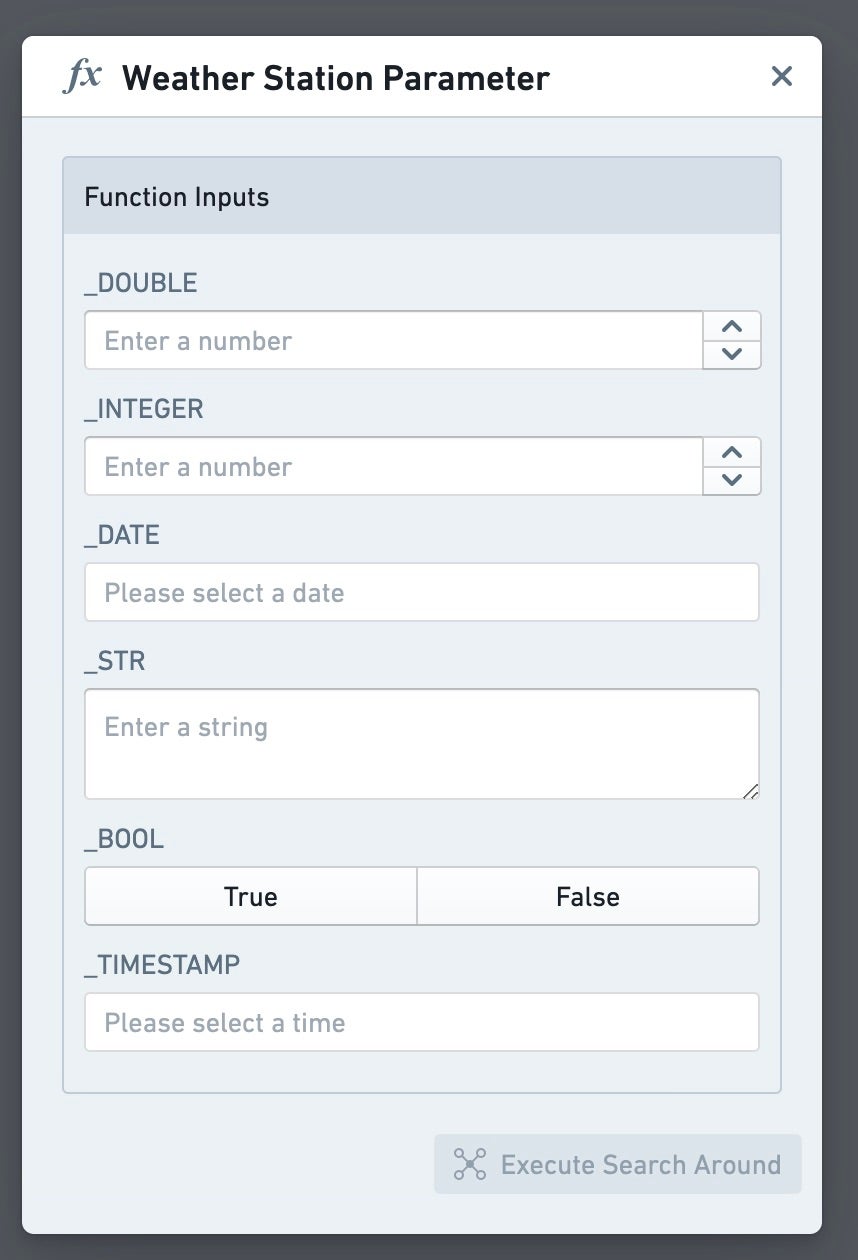
반환 계약
반환형은 IGraphSearchAroundResultV1 또는 Promise<IGraphSearchAroundResultV1>로 선언합니다. Vertex는 이름과 구조로 함수를 발견하므로 인터페이스 이름과 필드를 유지합니다.
다음 내용을 graphTypes.ts에 둡니다.
export interface IGraphSearchAroundResultV1 {
    directEdges?: IGraphSearchAroundResultDirectEdgeV1[];
    intermediateEdges?: IGraphSearchAroundResultIntermediateEdgeV1[];
    orphanObjectRids?: string[];
    objectRidsToGroup?: string[][];
    layout?: string;
}

export interface IGraphSearchAroundResultDirectEdgeV1 {
    sourceObjectRid: string;
    targetObjectRid: string;
    linkTypeRid?: string;
    label?: string;
    direction?: string;
}

export interface IGraphSearchAroundResultIntermediateEdgeV1 {
    sourceObjectRid: string;
    sourceToIntermediateLinkTypeRid?: string;
    intermediateObjectRid: string;
    intermediateToTargetLinkTypeRid?: string;
    targetObjectRid: string;
    label?: string;
    direction?: string;
}
간선과 독립 객체
| 필드 | 동작 |
|---|---|
| directEdges | 두 객체 사이에 직접 간선을 만듭니다. 실제 링크의 linkTypeRid를 넣으면 그 표시 이름과 방향을 인식합니다. |
| intermediateEdges | 두 객체 사이에 중간 객체를 묶은 간선을 만듭니다. 같은 양끝의 여러 중간 객체는 한 간선으로 묶입니다. |
| orphanObjectRids | 다른 결과 객체와 연결되지 않은 독립 객체를 추가합니다. 간선에 이미 등장한 객체는 중복 기재할 필요가 없습니다. |
| objectRidsToGroup | RID 배열들을 그룹으로 지정하여 각 그룹을 한 노드로 묶습니다. 같은 RID가 여러 그룹에 있으면 그 그룹들이 합쳐집니다. |
중간 간선에는 원본에서 중간 객체로, 중간에서 대상으로 가는 두 링크 RID를 선택적으로 넣을 수 있습니다.
Vertex는 함수가 새로 추가하는 객체만 중간 간선 안에 묶습니다. 그래프에 이미 있거나 함수 입력으로 전달한 객체는 자체 노드로 남습니다.
레이블, 방향과 배치
label은 함수가 만든 연결의 사용자 정의 레이블입니다.
| 설정 | 값과 기본값 |
|---|---|
| direction | NONE, FORWARD 또는 REVERSE. 생략하면 FORWARD |
| layout | auto, auto-grid, grid, linear-row, linear-column 또는 circular. 생략하면 계층 배치 |
linkTypeRid로 생긴 실제 링크는 direction의 영향을 받지 않습니다. layout은 앱에서 Search Around를 직접 실행할 때만 적용하고 템플릿으로 그래프를 생성할 때는 적용하지 않습니다.
TypeScript v1 예시
아래 구현은 생성 API에 다음 바인딩이 있는 항공 예시입니다.
- ExampleDataRoute.flights는 항공편들의 다중 링크입니다.
- departingAirport와 arrivingAirport는 단일 공항 링크입니다.
- ExampleDataAirport.routes는 다음 도착지로 연결되는 노선들입니다.
graphTypes.ts와 같은 디렉터리의 searchArounds.ts에 작성합니다.
import { Function, Integer, UserFacingError } from "@foundry/functions-api";
import { ExampleDataAirport, ExampleDataRoute } from "@foundry/ontology-api";
import type {
    IGraphSearchAroundResultDirectEdgeV1,
    IGraphSearchAroundResultIntermediateEdgeV1,
    IGraphSearchAroundResultV1,
} from "./graphTypes";

export class VertexSearchArounds {
    private requireRid(rid: string | null | undefined): string {
        if (rid == null) {
            throw new UserFacingError("객체 RID를 확인할 수 없습니다.");
        }
        return rid;
    }

    @Function()
    public async allFlights(
        routes: ExampleDataRoute[],
    ): Promise<IGraphSearchAroundResultV1> {
        const intermediateEdges: IGraphSearchAroundResultIntermediateEdgeV1[] = [];
        await Promise.all(routes.map(async route => {
            const [flights, departure, arrival] = await Promise.all([
                route.flights.allAsync(),
                route.departingAirport.getAsync(),
                route.arrivingAirport.getAsync(),
            ]);
            if (departure === undefined || arrival === undefined) {
                throw new UserFacingError("노선의 출발 및 도착 공항이 필요합니다.");
            }
            const sourceObjectRid = this.requireRid(departure.rid);
            const targetObjectRid = this.requireRid(arrival.rid);
            for (const flight of flights) {
                intermediateEdges.push({
                    sourceObjectRid,
                    intermediateObjectRid: this.requireRid(flight.rid),
                    targetObjectRid,
                });
            }
        }));
        return { intermediateEdges };
    }

    @Function()
    public async destinations(
        airport: ExampleDataAirport,
        distance: Integer,
    ): Promise<IGraphSearchAroundResultV1> {
        let currentAirports: ExampleDataAirport[] = [airport];
        const directEdges: IGraphSearchAroundResultDirectEdgeV1[] = [];
        for (let step = 0; step < distance && currentAirports.length > 0; step += 1) {
            const nextAirports = new Map<string, ExampleDataAirport>();
            await Promise.all(currentAirports.map(async sourceAirport => {
                const routes = await sourceAirport.routes.allAsync();
                const destinations = await Promise.all(
                    routes.map(route => route.arrivingAirport.getAsync()),
                );
                const sourceObjectRid = this.requireRid(sourceAirport.rid);
                for (const destination of destinations) {
                    if (destination === undefined) {
                        throw new UserFacingError("연결 노선의 도착 공항이 필요합니다.");
                    }
                    const targetObjectRid = this.requireRid(destination.rid);
                    directEdges.push({ sourceObjectRid, targetObjectRid });
                    nextAirports.set(targetObjectRid, destination);
                }
            }));
            currentAirports = Array.from(nextAirports.values());
        }
        return { directEdges };
    }
}
allFlights는 노선의 모든 항공편을 출발과 도착 공항 사이의 중간 간선으로 반환합니다. 다음은 SAN에서 FAT로 가는 노선의 예시입니다.
destinations의 distance는 지리적 거리가 아니라 항공편 연결 단계 수입니다. ADK에서 2를 지정한 예시는 두 단계 이내의 도착 공항들을 탐색합니다. 각 다음 단계의 공항은 RID로 중복을 줄여 구성합니다.
TypeScript v2 집합 입력 예시
같은 graphTypes.ts를 두고 다음을 allFlights.ts에 작성합니다. 생성 OSDK에서 두 공항 링크는 단일 링크, flights는 다중 링크인 구성을 사용합니다.
import type { ObjectSet } from "@osdk/client";
import type { ExampleDataRoute } from "@ontology/sdk";
import type {
    IGraphSearchAroundResultIntermediateEdgeV1,
    IGraphSearchAroundResultV1,
} from "./graphTypes";

export default async function allFlights(
    routes: ObjectSet<ExampleDataRoute>,
): Promise<IGraphSearchAroundResultV1> {
    const intermediateEdges: IGraphSearchAroundResultIntermediateEdgeV1[] = [];
    for await (const route of routes.asyncIter()) {
        const [departure, arrival] = await Promise.all([
            route.$link.departingAirport.fetchOne({ $includeRid: true }),
            route.$link.arrivingAirport.fetchOne({ $includeRid: true }),
        ]);
        for await (const flight of route.$link.flights.asyncIter({ $includeRid: true })) {
            intermediateEdges.push({
                sourceObjectRid: departure.$rid,
                intermediateObjectRid: flight.$rid,
                targetObjectRid: arrival.$rid,
            });
        }
    }
    return { intermediateEdges };
}
단일 링크의 fetchOne은 대상이 없거나 조회가 실패하면 오류를 전달합니다. RID를 출력해야 하므로 $includeRid: true를 명시합니다. 항공편을 배열로 모두 모을 필요 없이 읽으면서 간선을 만듭니다.
게시와 문제 확인
가능한 한 비동기 조회를 사용합니다. Vertex는 가장 최근 게시한 함수 버전을 사용하므로 게시할 브랜치나 커밋에 1.0.0 같은 semantic version 태그를 지정합니다.
저장소 Repository Settings의 Ontology에 사용할 객체와 링크 접근이 구성되어 있어야 합니다. 유형과 기반 데이터셋이 다른 프로젝트에 있다면 저장소 프로젝트에 해당 리소스들의 참조가 필요합니다.